Monday, 26 November 2012

Samsung’s ATIV Smart PC Unveiled


          A Tmomentum further with the ATIV Power PC, their Windows 8 based device. The promise here is the soul of a power pc in the body of a media tablet. We had a sneek peek at the device, and came away mighty impressed.
          
         The machine boasts a very decent processing beef, a mix of the Intel atom for the ATIV Smart PC and an impressive i5 variation in the ATIV Smart PC Pro. Design wise, its sleek, the brushed aluminum touch taking it on to the premium stage.

          We tried out the S Pen, and yes, the stylus blended in perfectly for the Windows 8 tile format. Both versions have an impressive 1920x1080p display with 400nit brightness.One point that was highlighted during the presentation was Samsungs proprietary anti-ageing battery technology which essentially ensures the battery keeps up to 70% of its capacity for up to 1500 charges, meaning an average 3 year cycleIV Smart PC's i5 verion adds a touch of pro to the tablet space.

The first iteration of the Slate PC had got us all excited welcome digression from lightweight tablets to a well connected tablet cum lapotop, connectivity dock and all.

SanDisk ReadyCache 32GB SSD


Solid state drives, despite having coming down in prices, are still beyond the reach of the average consumer, especially when the price per gigabyte ratio is considered.

For roughly AED 400 you can either get a 1TB (or more, depending on brand) hard drive, compared to a 120GB (or lower, depending on brand) solid state drive. So either you invest heavily in an SSD and only have Windows and a few other daily use software on it, or stick to the tried and tested mechanical hard drives.

Hybrid Systems
          Thankfully there are a few manufacturers out there who provide a solution that’s in-between. Sure, Seagate has their Momentus XT hybrid drives, and Western Digital is also coming up with their own solution early next year. However, even that is a solution limited by capacity

And so SanDisk brings a solution that’s more practical for people who don’t want to disrupt their existing setups, nor pay a hefty price for the accompanying speed bump. The SanDisk ReadyCache 32GB SSD is basically a drive that’s designed to bring an ultra-fast caching solution for your current mechanical hard drives.

The proposition is simple: you plug in the SanDisk ReadyCache 32GB SSD into your PC, download the software which sets up your drives’ data to be cached on the SSD. After some time (hours to days) the SSD software recognizes your frequently used programs and their data is cached onto the SSD for instant use whenever you next launch your software of choice.

Setup          So let’s break it down a little, stating with the installation. The SanDisk ReadyCache 32GB SSD comes with an instructional manual, a SATA III (6Gbps) data cable, a 3.5-inch bracket with screws and the SSD itself. Given the extremely low profile of just 7mm, the SanDisk ReadyCache 32GB SSD can even be used in slim laptops (that have capacity for two drives).

Once installed, the drive immediately shows up on Windows 7. At this point you have to go and download the ExpressCache software which allows an extremely easy on-click solution to activate the caching on the SanDisk ReadyCache 32GB SSD and selecting which drives you want to cache

The ExpressCache software even shows the amount of storage been used on the drive for cache. Furthermore there’s even a real-time graph showing how much of the cached data is being used at the moment

And just in case you want to change your usage habits (brought about by installation of big games or programs) then you can simply click a button to clear out the entire cache on the drive and it’ll start from scratch. Don’t worry about losing any of the cached data as all of it is written onto the actual hard drives as well for backup automatically.

Benchmarks
          For testing the SanDisk ReadyCache 32GB SSD the below setup was used.

Let’s see how the SanDisk ReadyCache 32GB SSD improves performance on an existing setup. The results below are shown after running the tests for the fourth time, to give the drive time to cache the data. For comparison I have used the SanDisk Extreme 120GB SATA III SSD, the Seagate Momentus XT 750GB Hybrid drive and a test with a 1TB Seagate 7200RPM HDD coupled with a 20GB mSATA SSD to test out the Intel's Smart Response Technology .
Speed
I have used ATTO Disk Benchmark to get the sequential read and write speeds and Crystal Diskmark for 4K speeds.

PCMark 7          The PCMark 7 Storage benchmarks are some of the most stressing tests designed for modern hard drives and solid state drives. There are a number of tests performed, focusing on different aspects of the drive and eventually churn out a score based on the overall performance of the drive. Below I have shown the total PCMark 7 storage score for multiple hard drives and SSDs.

Windows 7          For the Windows 7 boot time, I installed a fresh copy of Windows 7 Home Premium 64bit on these hard drives, with just the basic drivers installed for the motherboard and graphics card. No antivirus or any other applications were installed since any programs installed by users are arbitrary and will change startup time. The time measured in seconds below is after POST (when the ‘Starting Windows’ logo appears) till the time I see the desktop and mouse.

As expected, the SanDisk ReadyCache 32GB SSD improves the speed significantly, although not, of course, toughing true SSD speeds. However, the jump we see from a regular 7200RPM hard drive to one that’s boosted by the SanDisk ReadyCache drive is significant.
Conclusion

So there you have it, if you want the speeds, or close to those of an SSD, the SanDisk ReadyCache 32GB SSD is a very elegant solution for your needs, more so because of the cheap setup cost and the simplicity with which things get rolling. Remember, that you won’t find an instant speed boost, time must be given for the ExpressCache software to learn your usage patterns, but in time you’ll be glad you have this hybrid system. Of course, if you’re building a new system and have some extra cash to spare, then you can always go with a complete SSD based system, like SanDisk’s Extreme series.

Samsung Galaxy S3 Mini


Packing an Android 4.1 Jelly Bean OS in a smaller package than the original, the Samsung Galaxy S3 Mini offers Super AMOLED skills but its up against the Motorola Razr i, Sony Xperia P and the original iPhone 4.

Samsung Galaxy S3 Mini: Size and build
          The Mini remains identical to theSamsung Galaxy S3in design terms. Theres a slim plastic body and removable back panel for the battery, SIM and MicroSD card. On the surrounding edges, theres just the power button and a volume rocker.

Everything is smaller than the Galaxy S3, naturally. Samsung can claim an ultra lightweight body as the Galaxy S3 Mini clocks in at 111.5 grams, designed to undercut the iPhone 5 by just half a gram. It matches the body of theiPhone 5 for size and the screen is now 4 inches as opposed to 4.8 inches.

Samsung Galaxy S3 Mini: Features
          Everythings been downsized from the original Galaxy S3. A dual-core processor replaces the quad-core one, a five megapixel camera replaces the 8 megapixel one and internal storage is now just 8GB, though theres the MicroSD expansion option.
Familiar Samsung apps like S Voice are Memo are embedded within the Jelly Bean OS and theres a decent pair of headphones in the box, offering a good upgrade from the poor headphones that accompany many Android smartphones (except those made by Sony...)

Samsung Galaxy S3 Mini: Screen
          The four-inch display is a Super AMOLED screen but theres a drop in resolution compared to the normal Galaxy S3. Its 480x800 pixels which means a 233 pixels per inch density compared the the wunder window display of the 306 pixels per inch of the Galaxy S3.
Remember that an iPhone 4 now costs the same as a Galaxy 3 Mini and has 330 pixels per inch. Overall, the screen looks sharp and is responsive but we know theres better for the money and, really, we miss the 4.8-inch screen of the full fat Galaxy S3.

Samsung Galaxy S3 Mini: Performance
          The Galaxy S3 Mini isnt slow and is able to handle multiple apps at speed with no slowdown. Yes, youll notice the dual-core processor struggle with the latest games aimed at high-end smartphones, but the presence of Jelly Bean out of the box and extra Samsung apps add value.
The camera looks woefully average in 2012 - its a five megapixel sensor under the bonnet but the results arent as convincing as cheaper rivals and a full step back from iPhone 4 or Motorola Razr i camera performance.

          Images lack definition, shutter speed is slow and low light shooting is particularly bad. The 8GB is storage isnt great for music or app fans either and although you can use a MicroSD card, were surprised that the Galaxy S3 Mini doesnt offer 16GB as standard.
Samsung Galaxy S3 Mini: Battery
The 1500mAh battery lasts a day and half with heavy use which is commendable and matches rivals in the same price band.

Samsung Galaxy S3 Mini: Verdict
          The Samsung Galaxy S3 Mini looks like a Galaxy S3 but has been stripped of all the things that made that smartphone the T3 smartphone of the year. The real killer is that it doesnt cost that much less than a Galaxy S3 which means, once youve seen one, its hard to accept second best, unless Samsung does the right thing by slashing the price, making this an acceptable proposition once more.

Windows Phone 8

Windows Phone 8 is the second generation of the Windows Phone mobile operating system, as officially confirmed by Microsoft at an MSDN seminar in August 2011 and previewed at Microsoft's 'sneak peek' at Windows Phone on June 20, 2012. It was released to manufacturing on September 14, 2012 and released to consumers on October 29, 2012.

Devices will be launched by three companies: Nokia, Samsung, and HTC. All devices will be based on System on Chips from Qualcomm. Current Windows Phone 7.x devices will not be able to run or update to Windows Phone 8 and new applications compiled specifically for Windows Phone 8 will not be made available for Windows Phone 7.x devices.
On June 20, 2012, Microsoft unveiled Windows Phone 8 (codenamed Apollo), a second generation of the Windows Phone operating system for release later in 2012. Windows Phone 8 replaces its previously Windows CE-based architecture with one based on the Windows NT kernel with many components shared with Windows 8, allowing applications to be easily ported between the two platforms.
Windows Phone 8 will also allow devices with larger screens (the 3 confirmed sizes are "WVGA 800x480 15:9","WXGA 1280x768 15:9","720p 1280x720 16:9" resolutions) and multi-core processors, NFC (which can primarily be used to share content and perform payments), backwards compatibility with Windows Phone 7 apps, improved support for removable storage (which now functions more similarly to how such storage is handled on Windows and Android), a redesigned home screen incorporating resizable tiles across the entire screen, Nokia Maps integration, a new Wallet hub (to integrate NFC payments, coupon websites such as Groupon, and loyalty cards), and "first-class" integration of VoIP applications into the core functions of the OS. Additionally, Windows Phone 8 will include more features aimed at the enterprise market, such as device management, BitLocker encryption, and the ability to create a private Marketplace to distribute apps to employees—features expected to meet or exceed the enterprise capabilities of the previous Windows Mobile platform.[4] Additionally, Windows Phone 8 will support over-the-air updates, and all Windows Phone 8 devices will receive software support for at least 18 months after their release.

On Monday Microsoft announced the Microsoft Surface, its latest foray into the tablet hardware market. Now the software giant has unveiled Windows Phone 8, the new version of its smartphone operating system. The new OS looks impressive on several levels:
  It borrows much of its code base from Windows 8. The result is an integrated ecosystem wherein developers can easily create apps and drivers that can be used on phones, tablets, and desktops.
  • WP8, which will support multi-core chipsets, a range of screen resolutions and removable MicroSD, also includes better support for native near-field communication (NFC) between phones, laptops, tablets, and PCs, meaning we could soon see more usable applications for NFC and a real mobile wallet.
  • WP8 will get Internet Explorer 10, complete with malware blocking, from Windows 8. IE10 provides significantly faster JavaScript performance and full HTML5 support.
  •  Nokia's turn-by-turn navigation and offline maps is built into WP8, which means all phones running the OS, not just Nokia Lumia handsets, will have access to these very popular features.
  •   Microsoft also talked about its renewed focus on its business users. The updated OS, which includes Office apps, will support BitLocker encryption, a secure boot mode, and deployment of Line-of-Business apps such as point-of-sale apps, product catalogs, dashboards, in-field or sales apps, workflow management apps, and monitoring and response apps. Admins will like features that let them manage WP8 devices using the same tools they use to manage the desktop, as well as the ability they'll have to set up apps for users without having to go through the Marketplace.

Is Windows Phone on Your Radar?
While BlackBerry used to be the smartphone of choice for business users, it's no secret that its maker, Research in Motion, has been in trouble for a while. In fact, a recent Nielson report indicates that the BlackBerry has only a 6% market share among recent smartphone buyers.
Apple's iPhone and scads of Android phones have filled in the gap as the Bring Your Own Device (BYOD) trend--in which employees are increasingly bringing their own mobile devices to work and using them to access company resources like email, file servers, and databases--continues.
Apple fans hold up their iPhones and point to an app store chock full of largely safe and secure apps that have made it through Apple's approval process and into the ecosystem's "walled garden." Android users like to boast about how they can customize their phones and choose from a plethora of different devices, unlike Apple's one phone form factor.
But what about Windows Phone? Are the phones that run it even on your radar?
If not, maybe they should be.
The UI is Great for Business Users
          I recently tested the 4G Nokia Lumia 900 (running Windows Phone 7.5 Mango) and in many ways preferred it to my Samsung Galaxy Nexus running Android 4.0. While the Lumia 900 and other current Windows Phones won't be able to upgrade to Windows 8, the Metro user interface it employs remains at the core of WP8. So if you haven't played around with Metro, there are a couple things you should know.
Unlike the iPhone and Android phones which show you screens and screens of small app icons, the Metro UI in Windows Phone features bright and colorful "live" tiles that morph as your phone is synced with real time information.
The People Hub, one of the main tiles on the home screen, can be particularly useful for business users. You can pin an individual, such as a manager or important client, to your start screen in a separate tile. This lets you see new emails, text messages, missed calls, and comments via social media from that person right on your start screen.
Within the People Hub itself you can click on a contact and see all of your latest interactions with him or her, which works out to be an easy way to get a quick refresh on the interactions you've had with someone you're about to meet.
You can also organize your contacts into Groups so you can email, text, or chat with a whole group at once. By pinning a group to the home screen, you'll see missed calls, new messages, and social networking updates from members of the group anytime you launch your phone.
You can also pin documents and spreadsheets to your start screen so as to easily view and edit them. For instance, while at a conference you could pin the event itinerary so as to quickly see what's coming up next or where you need to go.
Apps for Windows Phone
          One complaint people sometimes lodge against the Windows Phone ecosystem is that it doesn't have anywhere near the number of apps that Apple or Android have in their app stores.
That's true, but Microsoft is working hard to get developers more invested in coding for the platform. In fact, the company gives developers free phones and promises to prominently locate them in its app store and advertising spots. It also generouslyfinances the creation of apps that are popular on the other two platforms.
As such, many of the most useful apps you can get on the other two platforms are available from the Windows Phone Marketplace, such as Skype, Evernote, Amazon Kindle, Facebook, Twitter, and more.
And sometimes the Windows Phone version of an app is even better than its iOS or Android counterpart. LinkedIn, for example, makes good use of the Metro design in its Windows Phone app and updates its stream in real time with posts from connections, news affecting particular industries and updates from professional groups. It also lets you search for jobs and follow news from your favorite companies.
And business users entrenched in Microsoft products will certainly want to download Microsoft's Skydrive app, which is available in the Windows Phone Marketplace and lets you create and edit various kinds of file types--documents, presentations, spreadsheets, and more--right inside a Web browser, share them with others, and access them from your phone or other device.

Your Windows Phone Options
          Nokia, HTC, and Samsung make Windows Phone handsets that are available through AT&T, Verizon, Sprint, and T-Mobile for anywhere from free to $200 with a new two-year contract.
If you don't want to wait for the next wave of devices to emerge with WP8 on board, I would recommend the Nokia Lumia 900. You won't be able to upgrade it, of course, but it's a great 4G phone available for $99 at AT&T, or $50 at Amazon.com

New Generation Robot


 I think everyone should have a robot friend! This little guy was created by Aldebaran Robotics and has a 1.6GHz-giving him multi-tasking abilities- and two HD cameras. Originally developed for autistic children, Nao Next Gen Bot can have full conversations with you due to its ability to isolate and recognize specific words in sentences. He can also recognize your face and your movements and can even walk and play catch. Who needs a dog!


Basically you program Nao to do whatever you want him to do – pick your pens up off your office floor, talk to you or encourage you to keep working! You can even teach Nao yo plug himself in when his battery is running low – talk about low maintenance. To-date over 2,000 robots have been sold worldwide, and are currently being used in schools to help teach children.


Facebook Application " If I Die "

One of the biggest questions we face today is: what will happen to my Facebook once I die? Well, Willook, an Israeli start up, has created an application specifically designed to help you manage your Facebook after you pass away. The “If I Die” application gives you the option to leave a video or text message that will be automatically posted to your wall once you die.


Once you’ve installed the application you then pick three people on your Facebook to be in charge of making the announcement of your death. The three people will confirm that you have passed away and then the message will be posted.


It might sound creepy but it’s a very practical application that may make many people feel more comfortable about saying a final “online goodbye” to their friends and family. I think we’ll be seeing more and more applications that are focused on helping people notify their online friends that they have passed away – it’s good personal social media management.

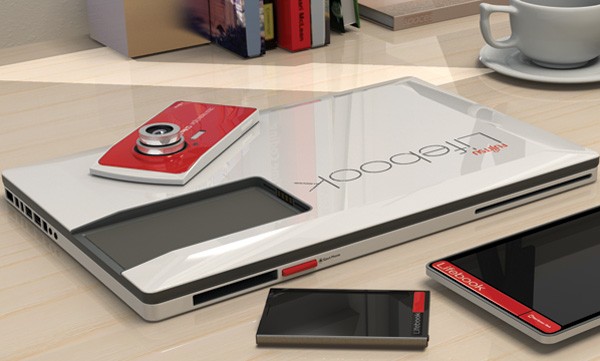
Lifebook Concept by FUJITSU


Concept Fujitsu Lifebook comes with removable smartphone, tablet, and digital camera.


These days, your average tech enthusiast typically has at their disposal a smartphone, a laptop, a tablet, and a digital camera; and that's listing the bare minimum. That's quite a bit of processing power and storage space spread out among different gadgets. What if it were possible to link all those devices together into one convenient package that uses all that computing power at once? That's the idea behind one designer's concept for a Fujitsu Lifebook, which would come with slots for a smartphone, digital camera, and tablet, for them all to all work together as one super device.


Fitting the digital camera to the front would mean pictures could be downloaded to the computer or other devices. Sliding in the smartphone/mp3 player would allow music to be played and other data to be shared across devices. The Lifebook 2013 concept doesn't have a keyboard itself, since an tablet becomes the keyboard once slotted into place. The tablet can also be used as a second display (like a larger Nintendo DS) or as a digital sketchpad with a stylus. Aside from potentially reducing the overall cost, another advantage to this setup would be that all the devices can be synced and updated simultaneously from the same hub.


"The proposed Lifebook is a laptop computer concept based on the principle of 'shared hardware,'" explains Chandra. "Currently a lot of hardware is wasted when we use separate devices, as there is often a lot of 'repeat' of data stored and features. For example if I have my songs on my music player, why do I have to block the same amount of storage on my laptop? Similarly, if I have a processor sitting in my tablet, why can it not also run/assist my laptop? If I have a fully functional camera with its own memory and image processing power, why do I need to have it repeated in my laptop?"


Put this way it sounds like a logical step forward for the next generation of laptops, though there is the obvious question of being limited to the concept's constituent devices, which would clearly be a bit limiting for the consumer.